Online Publishing: printQ web to print storefront software



In summary:
printQ is a flexible web to print storefront software that combines professional design tools, e‑commerce power and automation. Built on Adobe Magento, it offers multi‑page layout editing, 2D/3D previews, variable data printing and scalable storefronts for both B2B and B2C. printQ’s Editorial Designer enables online publishing of catalogs, magazines and brochures while its API‑first architecture and deep preflight automation streamline production. With SaaS or on‑premise deployment, printQ helps printers, agencies and enterprises create personalized print materials efficiently and reliably.
The Rise of Web to Print and Online Publishing
Digital transformation has reshaped how companies design and order printed products. Web to print storefront software encapsulates this shift by providing online portals where users can select products, personalize designs and trigger automated production. In the past, simple tools allowed customers to tweak templates and upload files, but they lacked scalability and integration. Modern solutions like printQ deliver enterprise‑grade functionality, combining e‑commerce, design and workflow automation into one platform. This evolution matters because marketing teams, print service providers and corporate buyers need to respond quickly to customer demands, ensure brand consistency and reduce manual overhead.
printQ is unique in this landscape. It’s the only web to print solution built entirely on Adobe Magento, delivering a powerful e‑commerce backbone with full shopping cart, promotions, payment and shipping capabilities. Unlike proprietary systems, printQ uses an API‑first, headless architecture. REST, SOAP, XML, JDF and JSON interfaces enable integration with ERP/MIS systems, DAM/PIM platforms and custom front ends. Because the platform is open and modular, customers avoid vendor lock‑in while benefiting from a global developer community and thousands of Magento extensions.
From Print Shops to Enterprise Workflows
The web to print model digitizes every step of the print lifecycle: customers configure products in a browser, preview the result, approve the design, place the order, and receive a print‑ready PDF automatically. Grand View Research reports that commercial printing revenue reached USD 501.36 billion in 2024 and is expected to grow to USD 598.06 billion by 2030. As demand increases, print service providers are shifting from dedicated on‑premise tools to SaaS solutions; 90 % of providers now prefer cloud hosting, although on‑premise remains relevant for businesses requiring full control. printQ supports both models, offering a secure cloud environment or a self‑hosted deployment depending on customer needs.
B2C and B2B Storefronts Explained
A web to print storefront is the customer‑facing interface of a print business. It allows users to browse catalogs, customize designs, upload artwork, preview products and place orders. There are two fundamental storefront types:
- B2C storefronts – open to the public. They prioritize ease of use, fast checkout and promotional products like flyers, posters and photo books.
- B2B portals – closed and password‑protected. They focus on corporate clients, franchises or distributed organizations where CI compliance, approval workflows and cost control are essential.
printQ unites these worlds in one system. Printers can operate public B2C shops while simultaneously running closed corporate portals. Each storefront leverages Magento’s e‑commerce features—discount codes, multi‑currency support, tax logic and customer accounts—and printQ’s advanced design, workflow and automation modules.
Why printQ Stands Out in Web to Print Storefront Software
Magento‑Powered, Open and Scalable
Adobe Magento forms the foundation of printQ, providing a proven, scalable e‑commerce stack. This allows printers to manage product catalogs, complex price calculations, promotions and order histories without reinventing core commerce functionality. Print‑specific extensions sit on top of Magento, so printers can cross‑sell and upsell complementary products within the same shop. Because Magento is open source, printQ benefits from a vast ecosystem of plugins and a vibrant developer community. Users can customize store themes, integrate payment gateways, or extend functionality without vendor restrictions.
Scalability is a major differentiator. printQ’s multi‑client architecture enables a single instance to manage one storefront or thousands of branded portals. Agencies or enterprises can spin up new shops for each brand, country or customer while administering them centrally. This is ideal for franchise networks, multinational corporations or agencies supporting several clients simultaneously. Over 1,000 live portals worldwide demonstrate the platform’s robustness and global adoption.
API‑First & Headless Flexibility
printQ adheres to an API‑first philosophy. REST and SOAP APIs, along with XML, JDF/XJDF, CSV and JSON endpoints, allow seamless integration with existing business systems. The headless approach means the front end is decoupled from the back end: developers can build custom user interfaces or embed printQ’s editor into other e‑commerce platforms like Shopify, BigCommerce or Shopware. This flexibility ensures printQ can fit any workflow or enterprise architecture.
Integrated Automation & Preflight
Automation is at the core of printQ. The platform automatically generates print‑ready PDFs and JDF files after an order is placed. A dynamic preflight check validates uploaded files for resolution, color spaces, fonts and other print parameters, correcting issues before production. Real‑time price calculation, plausibility checks for combinations of materials and finishes, and automated job tickets reduce errors and speed up processing. For designers who prefer Adobe InDesign, printQ offers a dedicated workflow: templates created in InDesign can be imported, with placeholders and locked design elements recognized by the system.
Professional Online Editor with 2D/3D Previews
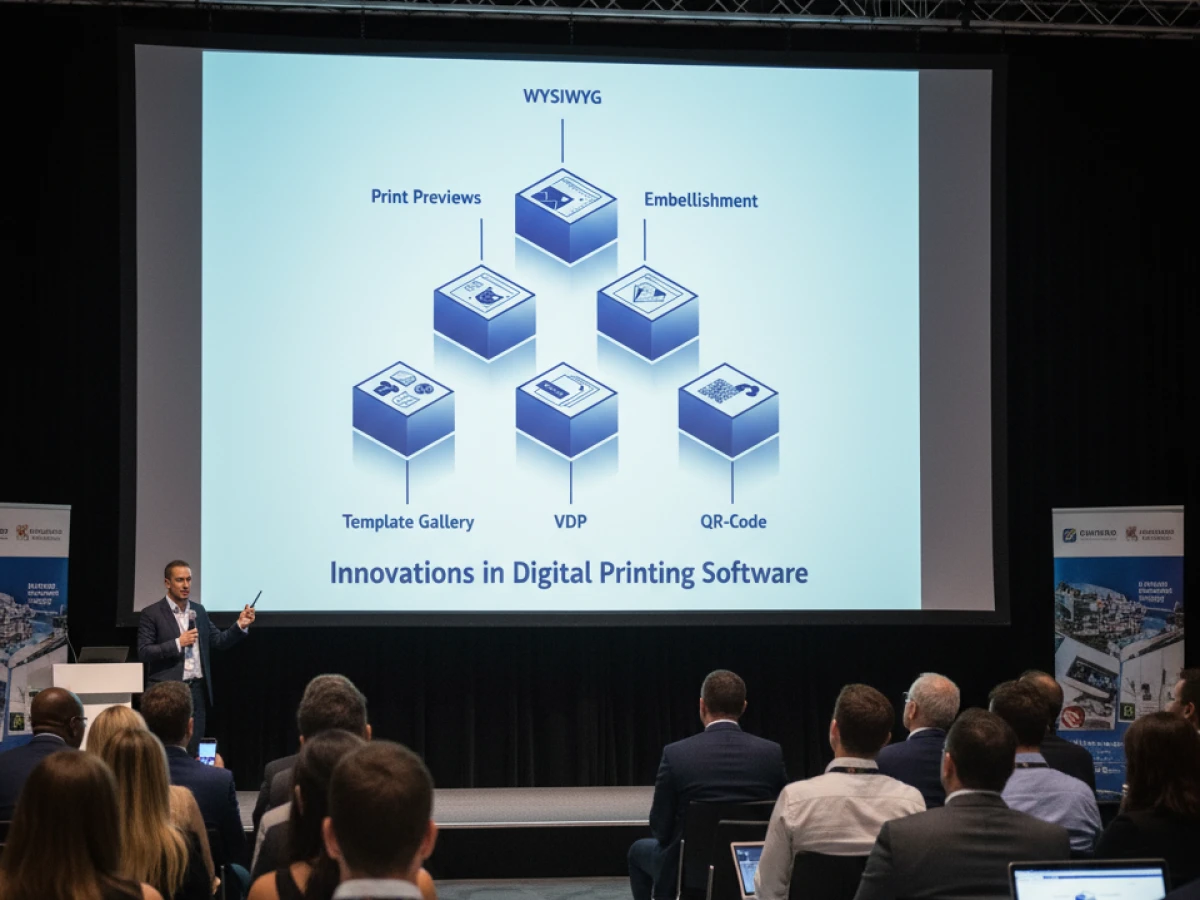
At the heart of printQ is its WYSIWYG designer. Users can drag and drop text, logos and images into place; the editor adjusts fonts, colors and sizes automatically. A 2D view offers precise layout control while the 3D preview lets customers rotate and zoom the product, providing a realistic visualization. printQ’s vectorization & embellishment module converts raster images to vector graphics directly in the browser and allows the addition of spot coatings, hot foil or embossing, with each layer stored separately in the PDF. This reduces prepress time by up to 80 %.
Template Gallery & Variable Data Printing
printQ features a template gallery containing millions of professionally designed layouts. The Dynamic Layout function adapts designs to different formats, meaning a single design can be repurposed across business cards, flyers, catalogs and more. Variable Data Printing (VDP) enables mass personalization: users can upload data via Excel/CSV, integrate with databases, or enter values manually. printQ’s PDF/VT support allows high‑volume production of personalized mailings, catalogs or event guides while maintaining print performance.
Mobile Upload & Image Management
Modern marketing campaigns rely on user‑generated content and real‑time imagery. printQ’s mobile image upload allows customers to scan a QR code and send photos directly from a smartphone into the editor. The built‑in asset manager and integrations with DAM and PIM systems enable centralized control over images, logos and other media. Users can upload, crop, scale and assign images within the editor while maintaining CMYK, RGB and spot color profiles.

Collaboration, Roles & Approvals
Publishing is rarely a solo activity. printQ’s platform supports real‑time collaboration where multiple users can edit documents simultaneously. Role‑based permissions—author, designer, editor, approver—control access and protect corporate design elements. In‑document commenting and version control streamline review cycles, eliminating lengthy email threads and ensuring accountability. Automated approval workflows with notifications accelerate sign‑off and reduce time‑to‑market.
Integration & Multi‑Format Output
Once a design is approved, printQ’s automation engine performs preflight checks to validate resolution, fonts, colors and overprints. The system then generates print‑ready PDF/X‑4 files complete with trim marks, bleeds and CMYK profiles. Because the platform connects directly with production workflows via JDF/XML, approved files can flow seamlessly into MIS/ERP systems and printing devices.
Deep Dive: The Editorial Designer
printQ’s Editorial Designer brings professional desktop publishing capabilities into the browser. It supports complex, multi‑page publications like magazines, catalogs, annual reports and guides. Teams can create unlimited pages, manage master pages, set multi‑column grids and link text frames so content flows automatically between pages. Here’s how it elevates online publishing:
Multi‑Page Layout Management
Users can:
- Add unlimited pages and reorder them via a visual thumbnail overview.
- Create master pages to apply recurring elements across an entire document.
- Link text frames to flow content automatically between pages.
- Set multi‑column grids, headers and footers.
These capabilities allow layout artists to handle complex structures such as product catalogs or magazines without leaving the browser.
Professional Typography
printQ offers full typographic control with paragraph and character styles, OpenType ligatures and kerning, hyphenation, justification and adjustable tracking and leading. Style libraries ensure brand consistency across multi‑page documents.
Integrated Media & Asset Management
The Editorial Designer connects with printQ’s asset management system or external DAM/PIM platforms. Users can insert placeholders, auto‑scale images to fit frames, and manage different color profiles. Mobile uploads enable real‑time content contributions.
Data‑Driven Publishing & Mass Customization
By combining VDP with the Editorial Designer, teams can import product or article data from CSV, XML or API sources and auto‑fill tables, text blocks and image placeholders. Pagination rules balance content across pages, enabling the generation of hundreds of personalized catalogs or event guides in minutes.
Collaboration & Workflow Control
The multi‑user environment supports simultaneous editing, commenting and role‑based permissions. Version control tracks every change. This collaborative framework eliminates file confusion and accelerates editorial workflows.
Automated Preflight & Interactive Preview
The Editorial Designer performs automatic preflight checks, flagging issues like resolution, fonts or overprints. Output is generated in PDF/X‑4 format with trim marks and bleeds. Interactive preview modes include flipbook-style views and full‑page overprint simulation. Combined with automated approval workflows, this ensures that “what you see is what you print.”
Real‑World Applications
The Editorial Designer suits a variety of publishing scenarios:
- Corporate catalogs & product brochures: Import live product data, automatically update text and images, and generate catalogs quickly.
- Magazines & editorial publications: Writers, designers and editors collaborate in the same interface, eliminating file transfers and version chaos.
- Annual reports & corporate publications: Integrate financial data and charts while ensuring compliance and accuracy.
- Franchise networks: Provide localized templates for franchisees while enforcing corporate design guidelines.
- Government & education: Create guides and brochures with transparent review workflows and centralized control.
Technology Under the Hood
Because the Editorial Designer runs on the same Magento foundation as printQ, it inherits multi‑language, multi‑currency and analytics features. The API‑first architecture connects with DAM, PIM, ERP and CMS systems to ensure content and assets are always synchronized. Direct production integration via JDF/XML allows approved documents to flow straight into printing devices, eliminating manual prepress steps.
Security & Deployment Options
printQ offers SaaS and on‑premise deployments. Transfers are encrypted, and granular user permissions restrict access to sensitive content. Organizations handling confidential publications—such as publishers or corporate clients—can choose the deployment model that aligns with their compliance requirements.
Case Studies and Success Stories
Many printers, agencies and enterprises worldwide trust printQ to power their storefronts and publications.
SAXOPRINT – Scaling Public and Corporate Portals
SAXOPRINT, one of Europe’s largest online printers, uses printQ to manage an extensive product portfolio across thousands of daily orders. They operate public B2C shops and closed B2B portals, all running on a single Magento foundation. The multi‑client architecture enables them to easily create new corporate portals that respect each customer’s corporate identity.
Druckhäusle – Fast Entry into E‑Commerce
The Swabian print shop Druckhäusle wanted a flexible solution to quickly establish an online presence. With printQ, their shop went live within three months. The intuitive editor and automation reduced order processing time, while the modular structure allowed them to add features like bonus systems later.
Velocity Graphics – Customized B2B Portals
Velocity Graphics created a closed portal for a restaurant chain with more than 100 locations. Each franchise can customize menu boards within locked templates, balancing flexibility and compliance. printQ’s ability to process large 26 × 51.5 inch files and allow rapid updates of prices and images was decisive. The solution uses PDFlib and custom functions to handle large format documents efficiently.
Global Adoption
Beyond these examples, printQ is trusted by numerous international customers including Ortmaier Druck (Germany), Newprint (Canada), Offset5020 (Austria), Longo (Italy), Flyeralarm and Cimpress. This diversity highlights printQ’s adaptability across markets and languages.